Fast Screen Recording

Record your daily routine screen activity like your online Video Meetings, Video Classes, Self Tutorials and more.

0.0
Rating out of 5 Based on 0 reviews

Fast Screen Recorder is software to record your computer screen activities like your important video conference, video tutorials, educational activity. If you are a gamer then you can record all moments of your game where you are playing after that you can share with your friends.

Pricing of Fast Screen Recording

1 Year

INR 399
INR 0.00

1

399

Buy Now

Key Features of Fast Screen Recording

Key Features:
  • Audio Capture
  • Screen Capture
  • Screenshot
  • No Account Required
  • User Friendly Interface

Key Specification

Other Categories: Screen Recording Software For PC Screen Recording Software
Deployment: On Premise
Customer Support: Email
Customization: No
Languages Support: English

Who uses Fast Screen Recording

Personal

Personal
StartUps
StartUps

Company Details

Company Name: FastPCTools
Headquarter: Jaipur, Rajasthan India
Social Media:

Fast Screen Recording Description

Fast Screen Recorder offers a robust suite of features designed to empower both beginner and advanced users. Its interface is simple enough for non-technical users while offering the precision and control demanded by professionals.

Here’s a breakdown of the core features that define the tool’s competitive advantage:

Screen Recording with High Precision

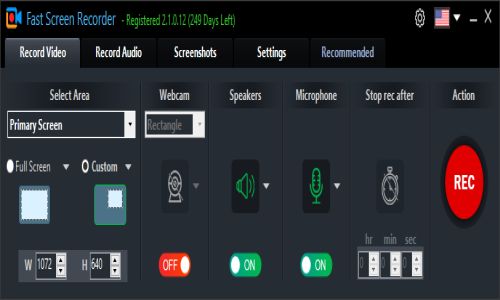
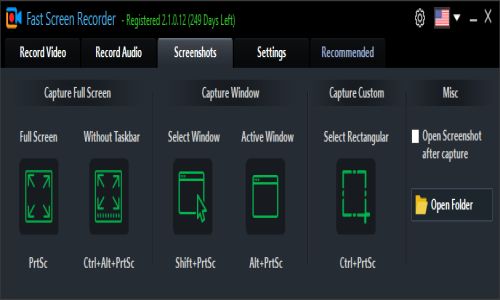
Fast Screen Recorder allows users to capture their entire screen, a specific region, or even a single application window. This flexibility ensures that you can tailor your recordings exactly as needed, avoiding unwanted distractions and maintaining viewer focus.

Audio Recording

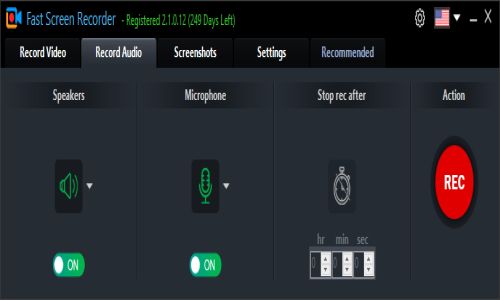
The software includes dual-channel audio recording, letting users record system sound, microphone input, or both simultaneously. This is especially useful for voice-over narrations, podcast-style commentary, or instructional videos.

Auto Stop Recording

Fast Screen Recorder includes a time-based auto-stop feature, which lets users set a recording duration. This is ideal for automated workflows and ensures recordings don’t continue indefinitely if unattended.

Capture Without Watermark

Unlike many freemium screen recorders that clutter outputs with brand watermarks, Fast Screen Recorder offers clean video output—even in the free version. This is a major plus for professionals creating branded or client-facing content.

One-Click Start and Stop

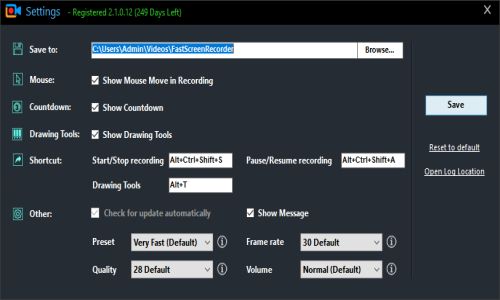
Its minimalistic UI includes quick access buttons to start, pause, resume, and stop recording with a single click. This helps eliminate distractions and makes it easier to record on the fly

Alternative

Vmaker

By Vmaker

0.0
Rating out of 5 Based on 0 reviews

Screencastify

By Screencastify

0.0
Rating out of 5 Based on 0 reviews

NinjaCapture by 500apps

By NinjaCapture by 500apps

0.0
Rating out of 5 Based on 0 reviews

Fast Screen Recording Video/Screenshots

User Reviews

no-reviews
Share your experience! Be the very first reviewer. Write a Review

Frequently Asked Questions (FAQs)

The user group of Fast Screen Recording are as follows :

  • Personals
  • Startups

Fast Screen Recording has 1 plans,

  • 1 Year INR 399 1

Fast Screen Recording is allowed 2 Days Free Trial.

The key featuers of Fast Screen Recording are as follows :

  • Audio Capture
  • Screen Capture
  • Screenshot
  • No Account Required
  • User Friendly Interface

Fast Screen Recording pricing model : Yearly

Fast Screen Recording is Offline Software.

No

Fast Screen Recording offers Email support.

Fast Screen Recording provides Blogs for the software training.