Blooket

Level up classroom engagement

0.0
Rating out of 5 Based on 0 reviews

What is Blooket?
Blooket is an interactive, web-based game-based learning platform that combines educational content with fun, engaging quiz-style gameplay tailored for students and educators. Teachers can use pre-made question sets or create their own, and deliver them through dynamic game modes—like Classic, Tower Defense, and Café—that blend learning with competition and strategy. Blooket supports both live classroom participation and asynchronous assignments, offering fiction-like game experiences that reinforce curricula and foster active learning. Ideal for learners ranging from early grades through high school, it’s designed to boost engagement, provide instant feedback, and surface data-driven insights on student understanding.

Pricing of Blooket

no-pricing
For get detailed pricing as per your requirements.

Key Features of Blooket

Key Features:
  • Academic/Education
  • Asynchronous Learning
  • Blended Learning
  • Certification & Licensing
  • Content Management
  • Corporate/Business
  • eCommerce Management
  • eLearning Companies
  • Learner Portal
  • Mobile Learning
  • SCORM Compliance
  • Social Learning
  • Synchronous Learning
  • Tests/Assessments
  • Video Conferencing
  • Registration Management
  • Content Management System
  • Social Media Integration
  • Onboarding
  • Compliance Management
  • Feedback Management
  • Scheduling
  • Calendar Management
  • User Activity Monitoring
  • Quizzes
  • Assessment Management
  • Higher Education
  • Individual Development Plans
  • Video Content
  • Activity Monitoring
  • For Education
  • Leaderboards
  • ISO Compliance
  • Asynchronous Learning
  • Corporate / Business
  • Tin Can API
  • Full Text Search
  • Reporting & statistics
  • Mobile Survey
  • Question Library
  • Interactive Content
  • Test / Quiz Creation
  • Content Delivery and Tracking
  • Course tracking
  • Offline Presenting
  • Built-in LMS
  • Online Calendar

Key Specification

Other Categories: Learning Management Software Education Software
Deployment: Cloud Hosted
Customer Support: Phone
Customization: Yes
Languages Support: English

Who uses Blooket

Personal
Personal

Company Details

Company Name: Blooket
Headquarter: United States
Social Media:

Blooket Description

Why Blooket? 

Blooket stands out as a unique educational tool that transforms traditional learning into an engaging experience. Unlike many standard quiz platforms, Blooket integrates game elements such as leaderboards, power-ups, and interactive modes that appeal to all ages. Teachers can easily create content or choose from a library of pre-made sets aligned with various subjects. The competitive, fast-paced nature of the games encourages participation and retention of knowledge. Whether in classrooms or remote settings, Blooket keeps learners attentive and excited to review content. Additionally, the platform is easy to navigate, making it ideal even for users who are not tech-savvy.

Benefits of Blooket 

 Boosts Student Engagement: Turns quizzes into fast-paced, fun challenges.

 Improves Knowledge Retention: Game mechanics reinforce learning through repetition and competition.

 Time-Saving for Teachers: Choose from thousands of ready-made question sets.

 Versatile Learning Modes: Assign games as homework or play live in class.

Customizable Content: Easily create question sets tailored to your curriculum.

 Motivates with Rewards: In-game rewards and rankings keep learners motivated.

 Cross-Device Compatibility: Play on laptops, tablets, or smartphones.

 Supports Group and Solo Play: Ideal for team-based or independent learning.

How to Use Blooket 

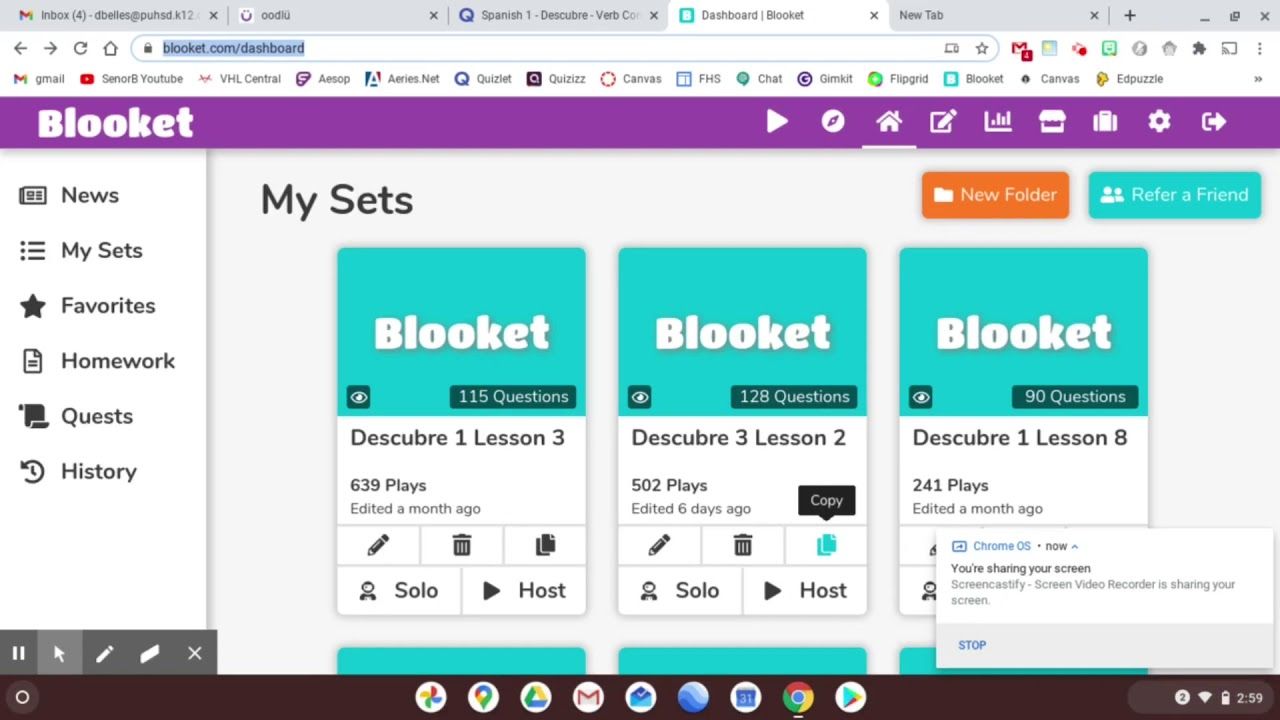
Using Blooket is simple and quick. First, a teacher or host creates an account and either selects a pre-existing question set or builds a custom quiz. After choosing a game mode (like Tower Defense, Gold Quest, or Classic), the host launches the game and shares the game code with participants. Students join using the code and compete to answer questions correctly and earn in-game rewards. Teachers can also assign games as homework with due dates. After the game, performance data is available for review, helping educators track progress. No app is required—just an internet-connected device and a browser.

Features of Blooket 

 Multiple Game Modes: Including Tower Defense, Crypto Hack, and Gold Quest.

 Large Question Bank: Access or create sets for subjects like math, science, and history.

 Live Hosting: Engage students in real-time learning sessions.

 Solo and Homework Modes: Great for self-paced or remote study.

 Student Analytics: Track performance and identify learning gaps.

Custom Avatars & Themes: Adds personalization and fun.

 Safe for Students: Kid-friendly interface with no ads or distractions.

Web-Based Access: No downloads needed—just a browser.

What Makes Blooket Different? 

Blooket separates itself from other quiz platforms through its unique combination of interactive games and academic content. Instead of static quizzes, Blooket incorporates diverse game formats that blend strategy, speed, and competition. Students aren't just answering questions—they’re racing to win, collecting points, and unlocking power-ups, which keeps them highly motivated. The user interface is playful and appealing, ideal for K–12 learners. Teachers love its simplicity and the flexibility to use Blooket in-person or virtually. With built-in data tracking and content sharing options, Blooket not only entertains but also supports informed instruction and improved learning outcomes.

Who Can Benefit from Blooket? 

Blooket is designed to serve a wide audience within the educational ecosystem.

 Teachers: Create dynamic lessons that keep students engaged.

Students (K–12): Learn while playing games and competing with classmates.

 Parents: Reinforce learning at home through fun, educational games.

 Tutors: Add excitement to one-on-one or group sessions.

 School Administrators: Encourage gamified learning throughout the curriculum.

 Homeschoolers: Use Blooket to make lessons interactive and track progress.
Anyone looking to combine learning with play can benefit from Blooket’s engaging and educational approach.

Is Blooket Easy to Use? 

Yes, Blooket is extremely user-friendly. Its intuitive dashboard lets teachers create or select quizzes within minutes. The platform requires no downloads or installations—just open a browser, log in, and you’re ready to go. Game setup is straightforward: choose a question set, select a game mode, and share a code with students. Students simply enter the code to join, making the process seamless. Even young learners or tech-novice users find the interface simple and fun. Real-time feedback and minimal distractions contribute to a smooth experience. Whether you're a teacher, student, or parent, getting started with Blooket is quick and hassle-free.

What Support Does Blooket Offer? 

Blooket provides a variety of support options to ensure a smooth user experience:

Alternative

Canvas LMS

Canvas LMS, The World's #1 Teaching and Learning Software

0.0
Rating out of 5 Based on 0 reviews

Google Classroom

By Google Classroom

0.0
Rating out of 5 Based on 0 reviews

Moodle Workplace

By Moodle

0.0
Rating out of 5 Based on 0 reviews

Blooket Video/Screenshots

User Reviews

no-reviews
Share your experience! Be the very first reviewer. Write a Review

Frequently Asked Questions (FAQs)

The user group of Blooket are as follows :

  • Personals

Blooket has 0 plans.

Blooket is not allowing Free Trial.

Blooket pricing model : Yearly,Monthly

Blooket is Online Software.

Yes

Blooket offers Phone support.

Blooket provides Help Guides for the software training.