

Mallow Technologies
Leveraging Technology
We are renowned for our creativity, invention, and innovation. We integrate honesty, integrity, and business ethics into all aspects of our business functioning. We take pride in delivering quality mobile and web applications. We do not just make apps, we make dreams come true.
Contact Information

Coimbatore, Tamil Nadu 639001 India
SparkPico

Startups Enterprise Telecommunications
Timeline: 100+ weeks Amount: 1,00,001 to 5,00,000
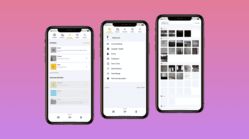
SparkPico is an item collection/storage/retrieval/interaction app. It can be used by people of every profession in a simple and convenient way. The best way to describe SparkPico is “ORGANISE”. There is always more than one way to express a point. It can be through pictures, videos, text, etc. But including all of this into one app with the flow can be tedious. With SparkPico it is all possible. SparkPico is a data organizing application for smartphones that can be used by any profession and any age group. Be it any type of data, SparkPico organizes it all. If the user wants to collectively store the data, the first step is to create an activity in the app. Each activity is different and has its respective data in it. Inside the activity, a user can add related pictures, videos, audios, notes, URL links, contacts and location using the add panel or the bottom bar. There are a total of 6 screens for the user to navigate which are displayed in the top bar. They are namely, Settings, Sparks, Captures, Activities lists and Search. The user can store the data in the activity in two ways, as a folder and Spark. People have many activities in their lives. Each activity is a set of images, text, hyperlinks, contact, task, location, time representations, etc that the person has captured or created. When found and created items are combined together in sparkPico, the result is a fresh new piece of creativity. SparkPico helps to share this creativity through organized content. That sharable content is what we call Spark. The user may have several activities ready but will need to make a note on when to do them. This is where SparkPico has introduced the concept of creating Tasks. The tasks can be created from the add panel and can be added to the respective activity. Users can change the status of the task as doing, done, hold, etc with the options provided.
Portfolio

 10,001 to 50,000
 100+
100+