Running a retail store or commercial business in India means navigating a highly regulated tax environment. Every time a transaction occurs at your counter, the document handed to the customer serves as a vital legal record. To maintain accurate financial books and remain lawful, deploying a modern, certified POS Software is an essential requirement for your storefront. Ever since the Indian government introduced the Goods and Services Tax framework, traditional paper pads and generic cash registers have become completely obsolete.

Looking for POS Software?
Check out Techimply's List of the Best POS Software in India for your business.
According to the comprehensive Deloitte India GST @ 7 Report, structural tax automation has heavily reduced manual corporate leaks while increasing nationwide digital compliance by over 34%. For independent business owners, a cash receipt is no longer just a scrap of paper showing a price. It is now a critical tax document that must carry explicit tracking numbers, verified business codes, and broken-down tax calculations. Investing in an advanced system ensures your storefront can handle busy checkout lines without facing expensive government penalties or audit delays.
What Is a GST-Compliant Invoice?
- Definition of a GST tax invoice: A GST tax invoice refers to a GST-compliant invoice that is issued by an assigned vendor to a buyer while carrying out transactions. It lists the precise products sold, their specific quantities, and the exact tax liabilities collected on behalf of the government. This document serves as the primary evidence for the transaction and allows business buyers to claim input tax credits safely.
- Tax invoice vs regular bill: A regular cash slip simply shows the total cost of the goods purchased without breaking down the legal tax components. Conversely, an official GST invoice explicitly separates the underlying product value from the state and central tax shares. To print these complex records legally, business owners must replace outdated tills with certified GST billing software.
- When businesses need to issue a GST invoice: Any merchant registered under the Goods and Services Tax net must generate an itemized invoice whenever they sell merchandise. According to the Ministry of Finance (CBIC) Compliance Guidelines, even small stores approaching the local turnover threshold must provide detailed receipts to safeguard consumer rights and record transaction trail data perfectly.
What Must a POS Print on a GST Invoice?
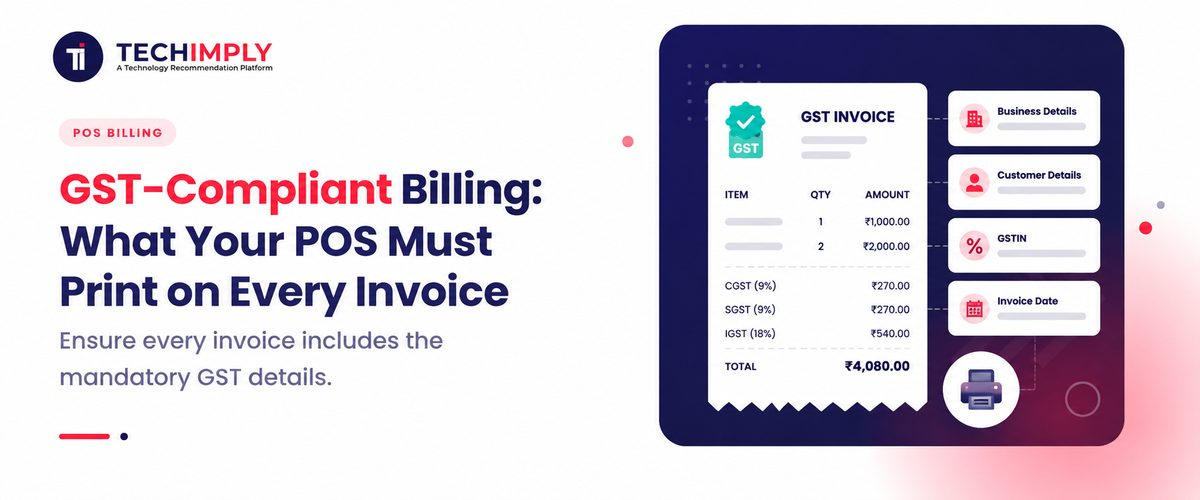
- Business name, address, and GSTIN: Your storefront's official legal name, complete physical address, and 15-digit Goods and Services Tax Identification Number must be visible at the very top. An advanced POS billing software prints these details clearly so tax inspectors and customers can verify your business registration status instantly.
- Unique invoice number and invoice date: Every single document generated at your cash desk must carry a consecutive, unbroken serial number unique to that financial year. The document must also print the precise date and time of the sale, which is automatically handled by updated POS invoice software to prevent illegal backdating.
- Customer details and GSTIN, where applicable: For corporate transactions, the document must include the buyer’s trade name, corporate delivery location, and verified registration number. Storing these buyer metrics inside your central Retail billing software database is crucial for ensuring your corporate clients can claim their business expense deductions seamlessly.
- Product or service description: The receipt cannot contain the items purchased under generic titles, such as Goods or Misc. The description of the products should be given specifically, for example, Cotton Men's shirt or 100ml Cough syrup, for the benefit of the end purchaser.
- HSN/SAC code: The Harmonized System of Nomenclature code for physical items or the Service Accounting Code for services must appear next to every product. A modern GST bill software stores these global regulatory codes inside its master product database to pull them up instantly during checkout.
- Quantity and taxable value: The receipt must display the exact number of units purchased alongside the unit price. It must then show the net taxable value of the items before any additional government duties or local cess charges are added.
- Discounts and other adjustments, where applicable: If you offer festive discounts, price cutbacks, or promotional item price adjustments, they must be subtracted directly from the line item. The POS billing system must show these subtractions clearly before computing the final tax liabilities.
- CGST, SGST/UTGST, and IGST amounts: The document must break down the total tax amount collected into specific legislative components. This means separating the Central GST and State GST amounts for local sales, which requires highly accurate GST invoicing software processing logic.
- Total invoice value: The final section must display the absolute gross amount payable by the consumer, combining the base taxable item values and all added tax shares. This
- Place of supply, if applicable: The invoice must indicate the state or union territory where the goods are consumed or supplied. This location metric tells the government which specific state should receive the tax revenue from that transaction.
- E-invoice, IRN, and QR code details, where applicable: For large enterprises cross-verifying data through central government servers, E-Invoicing Software can generate the official Invoice Reference Number required for eligible transactions. Modern E-invoicing software generates a high-density matrix graphic directly on the receipt paper, allowing field officials to scan and verify the sale instantly.
GST Billing for Different Types of Transactions
- B2B vs B2C invoices: Business-to-Business sales occur when you sell stock merchandise to another registered merchant who needs to claim tax credits. Business-to-Consumer sales are standard retail checkouts made to the final end-user. Your GST billing system must tag these transactions differently to route the financial summaries to the correct government filing formats.
- Intra-state vs inter-state sales: When you sell an item within your own state borders, your POS Software must split the tax evenly into Central and State shares. If you ship an item across state lines, the system must apply a single Integrated GST rate instead, which requires geographic intelligence at the checkout counter.
- Reverse-charge transactions: In specific legal scenarios, the liability to deposit tax shifts from the seller directly to the buyer, while Accounting Software helps track the resulting tax liability accurately.
- Exempt and nil-rated supplies: Some goods such as fresh milk, vegetables, or medical products may be exempt from taxes or have a zero% rate. Your GST invoice software should identify such items as either exempt or nil-rated to avoid confusion with taxable goods.
- Tax Invoice vs Bill of Supply: Registered merchants who deal exclusively in tax-exempt items or operate under the simplified Composition Scheme cannot collect tax from buyers. Instead of a standard tax layout, their GST invoice generator must print a specific document titled "Bill of Supply" to show no tax was added.
Common GST Billing Mistakes to Avoid
- Incorrect GSTIN: Typing a single character wrong in a business identification number invalidates the entire document and ruins your tax filings. Deploying a modern GST compliance software solution eliminates this issue by automatically validating corporate registration numbers against live government data screens.
- Wrong GST rate or tax type: Levying 18% on a 5% taxed good will result in audit issues and unhappy customers. A retail billing software with updated GST data will ensure that the right percentage is applied to the right goods, saving the business from losses.
- Missing HSN/SAC codes: Leaving these critical commodity classification codes off your printed slips can lead to steep regulatory fines from enforcement officers. Every product category managed through Inventory Management Software must be mapped to its legal code before the store doors open.
- Incorrect invoice numbering: Using duplicate receipt codes or failing to maintain a consecutive, unbroken number line triggers immediate red flags during tax reviews. A reliable POS billing system completely automates this tracking sequence, ensuring every counter terminal follows a strict numerical path.
- Wrong place of supply: Misidentifying the destination state causes your business to deposit tax into the wrong government account, resulting in painful correction paperwork. Cashiers must verify delivery PIN codes using integrated Shipping Management Software to help ensure the correct place of supply is recorded.
- Missing mandatory e-invoice details: High-turnover businesses that fail to print government-signed matrix codes or specific reference numbers face severe penalties. Utilizing an accredited E-invoicing software tool guarantees that every high-value invoice is cleared by official tax portals in real-time.
How to Make Your POS GST-Compliant
To ensure your retail operation stays completely protected from compliance risks, you must structure your daily technology workflows systematically. According to market research from the EY India Tax Tech Automation Report, businesses that actively automate their front-end billing platforms and use Tax Management Software can reduce manual accounting errors and improve compliance.
Follow this step-by-step procedure to make your hardware setup compliant:
- Configure business and GST details correctly: Open the master configuration panel of your POS Software. Enter your official trade name, legal warehouse address, and your verified 15-digit registration code. Ensure this information matches your official registration certificate perfectly.
- Add accurate HSN/SAC codes and tax rates: Access your central product inventory spreadsheet. Assign the correct regulatory identification code and corresponding tax slab to every single item. Utilize a bulk-upload tool inside your GST bill invoice software to update thousands of items simultaneously.
- Automate CGST, SGST, and IGST calculations: Turn on the location-based tax routing feature in your system. This allows your POS billing software to automatically read the customer’s delivery state and split the tax calculations correctly without requiring cashiers to make manual choices.
- Keep invoice formats and POS software updated: Enable automatic cloud updates on your terminal stations. The tax department frequently modifies item categories and rules, so running updated GST invoicing software guarantees your printed templates adapt to new legal mandates instantly.
- Regularly review invoices for compliance: Conduct weekly internal checks on your sales data. Run a test summary report using your GST invoice generator to ensure all required serial lines, tax rates, and corporate business codes are printing perfectly on the receipt paper.
Conclusion
In summary, aligning your counter checkout terminal with the national tax framework is the ultimate way to secure your retail business and build trust with your buyers. Running a busy storefront with outdated receipt templates or manual calculation sheets leads to major accounting errors and heavy government fines. Implementing a modern POS Software ensures your business captures critical transaction details, prints required item codes, and splits tax segments automatically.