
Are you having a hard time with writing the best caption to the post every time you post? You’re not alone. It can be hard to formulate the appropriate words that will help you attract attention and initiate communication, be it Instagram, LinkedIn, or Pinterest. There is where an AI Caption Generator comes.
By Using hi-tech AI for caption creation, the solutions enable you to create creative, relevant and audience-specific social media captions instantly, without making a guess. You can make your ideas your own powerful messages, which are reflective of your brand and the platform that you use, with a caption AI tool, producing witty captions for Instagram or professional posts on LinkedIn.

Looking for Instagram Scheduling Software?
Check out Techimply's best Instagram Scheduling Tools for your business.
This guide will show you how AI caption generators operate, how to use them in the best way, and how to select the appropriate caption length each social platform.
How to Instantly Create Captions with an AI Caption Generator
It does not necessarily mean that composing the ideal caption is a tense task. A caption generator AI that simplifies the automatic generation of on-brand captions helps you create creative captions within a few seconds, and this is the right option when you have to drive up engagement. Here’s how you can do it easily:
1. Choose the Right Platform
Begin by selecting the social media platform where you wish to post on, which is either Instagram, Linked In, Facebook, or Pinterest. An intelligent Instagram caption generator will automatically change the length and tone, depending on the location you are intending to make a post and this will save you the hassles of having to rewrite.
2. Add Your Post Details
Add some keywords or explain your picture or film. AI captions capture the content in your post and provide suggestions with the exact wording that will represent your brand, audience, and message.
3. Generate Multiple Captions Instantly
The AI caption generator will automatically generate several caption options as soon as you click the button known as Generate. You have an option to use various tones: funny, trendy or professional and select the one that reflects best your post.
4. Edit and Personalize Your Favorite Caption
Feel free to adjust the suggestion of the AI. Insert emojis, hashtags or your touch. The caption generator AI provides you with an excellent point of starting but your revisions make it be very genuine.
5. Copy, Post, and Engage
When you are content with what you have written as caption, copy it and post it. You can have an eye catching headline of the post that suits your brand and increases interaction immediately.
How AI Caption Generators Work
The technology transforms the process of writing captions as creators are able to use AI caption tools. You can post a photo, video or reel, and in spite of the AI-powered caption generator, you will find it easy to create the appropriate words within a few seconds. The following is how it works behind the scenes:
-
Understanding Your Content
The caption creator is an artificial intelligence tool that examines your text, video, or image when you upload an image, a video, or type a few keywords. It defines the tone, the theme, the emotions - it assists in creating captions that fit your post perfectly well.
-
Learning from Data and Trends
A social media caption generator operates on the data of millions of posts to get a feel of the type of captions that work. It analyzes trends and hashtags, patterns of engagement so that it develops captions that have more likes and comments.
-
Generating Relevant and Creative Captions
When the tool learns what you have to say and to whom you are addressing, the AI-powered caption generator will generate options of different captions immediately. You have an option of funny, emotional, professional, or promotional to suit your brand.
-
Customizing for Different Formats
Certain tools, such as an AI caption generator of video, go even further. They read your video pictures, speech or images to come up with captions, which are in line with what is happening in the video, making your videos more interactive and available.
-
Easy Editing and Posting
After receiving the suggestions, you are able to write down the caption and customize it with add-ons of emojis or hashtags. With smart caption writing, AI will ensure that you will always be good, creative, and time-efficient regardless of the number of posts done.
Best AI Tool For Social Media Captions
1. Hootsuite
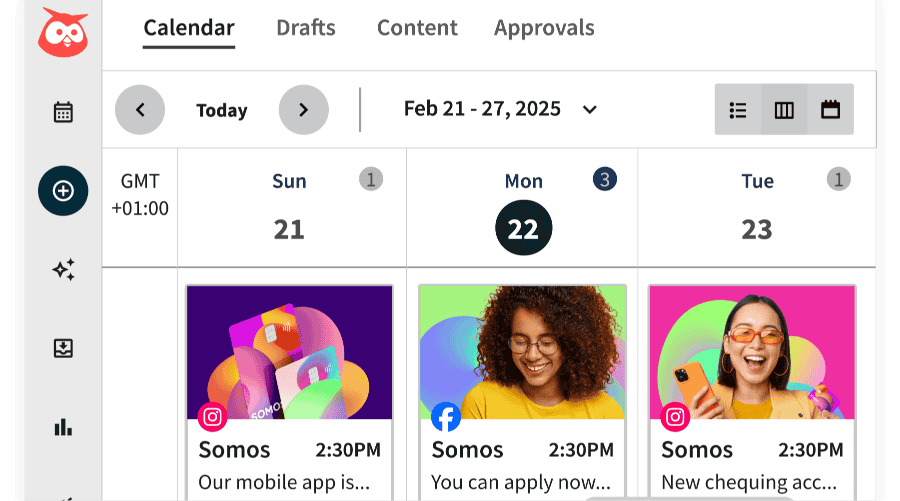
Hootsuite is a social media management system that has earned the most trusted name among the community and the inbuilt AI caption generator makes it quicker and smarter to form captions. It proposes tone, format and trending keywords according to your category of posting and the intended audience.
Top Features:
-
AI-powered caption suggestions for multiple platforms
-
Built-in scheduling and analytics
-
Team collaboration tools
-
Trend tracking for hashtags and keywords
Pros:
-
Excellent all-in-one social media management tool
-
Saves time with automated caption writing and post scheduling
Cons:
-
Can be expensive for small businesses
-
Interface may feel complex for beginners
Pricing: Starts at $99/month with a free trial available.
2. OwlyGPT
OwlyGPT is Hootsuite’s integrated AI caption generator that focuses solely on creative content generation. It is similar to a caption maker for Instagram, which allows it to assist you in generating catchy, ready-to-post captions that are in line with your brand voice and social media objectives.
Top Features:
-
AI-driven caption writing for all major social media platforms
-
Keyword and tone customization
-
Built-in post ideas and templates
-
Seamless integration with Hootsuite’s dashboard
Pros:
-
Great for consistent brand tone across posts
-
Simple, intuitive, and perfect for quick caption creation
Cons:
-
Works best only when paired with Hootsuite
-
Limited standalone features
Pricing: Included with Hootsuite’s paid plans starting at $99/month.
3. Jasper
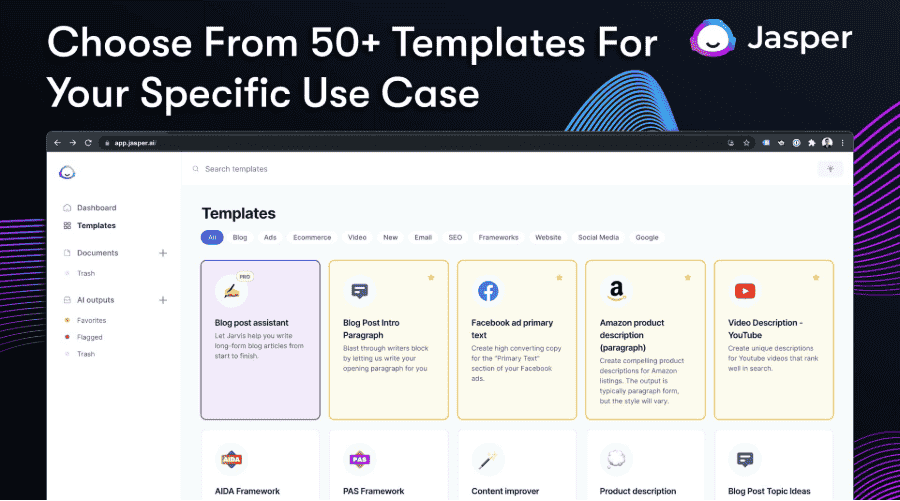
Jasper is an effective AI Caption Generator to create personalized and creative captions on any platform with the help of advanced language models. It is ideal to marketers, influencers, and brands looking to keep a uniform voice over the social platforms.
Top Features:
-
Pre-built templates for Instagram caption writing
-
Custom brand tone and voice setting
-
Integration with Canva and Grammarly
-
Multi-language support for global campaigns
Pros:
-
Highly creative output with a natural tone
-
Great for both short captions and long-form content
Cons:
-
Subscription can be costly for individual users
-
Requires manual editing for perfect alignment with visuals
Pricing: Starts at $39/month, with a 7-day free trial.
4. SocialBee
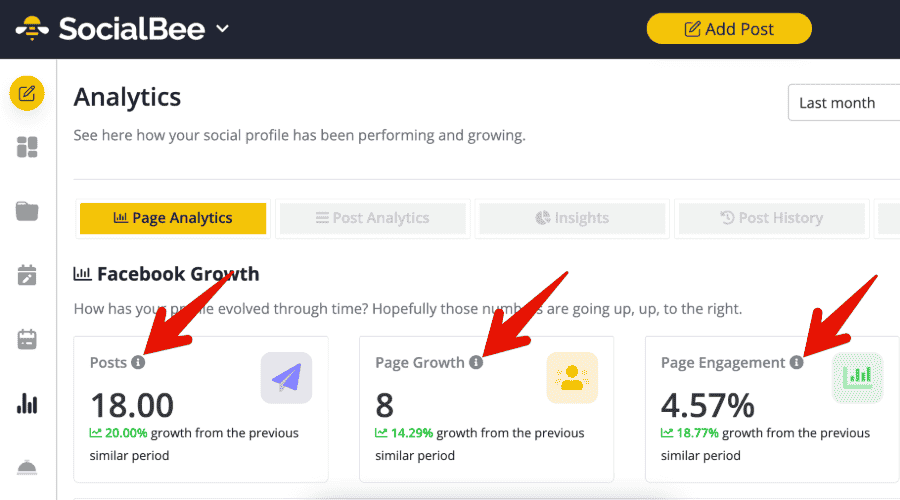
SocialBee is a mix of social media scheduler and smart caption maker in Instagram. The AI caption generator feature assists you in coming up with new ideas, creating captivating captions, and posting regularly, all through a single dashboard.
Top Features:
-
AI-driven caption and post creation
-
Category-based content organization
-
Automated post recycling
-
Analytics and engagement tracking
Pros:
-
Ideal for small businesses and solopreneurs
-
Easy to use with simple, clean design
Cons:
-
AI suggestions can sometimes feel repetitive
-
Limited customization for advanced campaigns
Pricing: Plans start at $29/month, with a 14-day free trial.
How To Decide the Right Length for Your Social Media Captions
It is not only important to find the right length of captions but also the content itself. It doesn’t matter if you are using free AI caption generator or doing it by hand, what you write at the beginning of the caption must resonate with your audience immediately. The good news? One of the possible solutions is a social media caption generator or AI Caption Generator that can assist you in achieving that right balance - short, engaging and platform-specific. We can look at the decision to be made as to each length.
How to Decide the Right Length for Your Instagram Captions
Instagram is about narration and feeling. Write your Instagram captions of about 125-150 characters to write short posts that attract attention before the See More button will cut your posts short.
When you post to Instagram with the help of a caption AI or AI caption generator, you can play with longer posts, up to 300 words, in the form of personal stories, the description of products, or the insights about the brands. The application of such tools as free AI Instagram caption generator or Instagram caption generator AI can be used to generate the appropriate tone and format that increase engagement.

Pro-tip
Start with an attention-grabbing line created by a caption maker for Instagram or Instagram caption creator—it can make all the difference.
How to Decide the Right Length for Your Facebook Captions
Captions of shorter length do better on Facebook. Aim for under 100 words. No matter if you use a caption generator free or create your own, you have to ensure that your text is conversational and valuable.
An AI caption or caption generator is a device that can help you to create emotional appeal and comprehensible social media caption that will earn likes, comments or shares.
Pro-tip
Test various tones of your AI powered caption generator friendly, persuasive, informative, and find out which one is more engaging.
How to Decide the Right Length for Your LinkedIn Captions
LinkedIn is best when it comes to telling stories and sharing revelations. The use of caption creator or an AI caption generator free will assist you in structuring longer posts, 100-200 words long, which sound professional but personal.
When you are writing captions with the help of an AI Caption Generator, you should concentrate on value-added caption writing, captioning with expertise, and captioning to stimulate a conversation.
Pro-tip
Use your caption maker to craft a strong opening and your AI for caption to simplify complex ideas for a broader audience.
How to Decide the Right Length for Your Twitter Captions
Twitter is a place of conciseness. Your caption post between 100 -150 characters. Having a caption generator AI, it is possible to test various short captions styles that can create impact immediately.
Pro-tip
Combine a caption creator or Instagram post writer tool with trending hashtags and emojis for more personality.
How to Decide the Right Length for Your Pinterest Captions
Pinterest is fond of openness and innovation. Whether on your captions or posts, maintain a length of 100-200 characters on your social media, and avoid superfluous posts. Add a caption generator free or caption generator AI to add keywords that add relevance and increase the possibilities of being discovered.
Pro-tip
A caption maker or Instagram caption maker can help you write clear captions for Instagram AI that also work beautifully for Pinterest visuals.
Bonus Tip: For Video Creator
In case you are dealing with reels or video content, use an AI caption generator with video or the Instagram caption generator with photos. The tools look through your photos and create captions, which perfectly fit your tone and message, and the tools do this automatically..
Conclusion
In the modern attention-seeking world, a well-worded caption is what will make your post stand out or pass by. The right caption generator will help you to create instantly engaging, on-brand high-impact content without any hassle. You are either looking to write concise and sometimes snappy AI captions on Instagram or lengthy and anecdotal lines on LinkedIn, an AI Caption Generator will guide you to write your message simply and effectively- each time.
Ready to take your social media to the next level?
It is time to start trying out a caption AI business and have intelligent technology write the best social media captions that capture your voice, are thought-provoking, and enhance your brand, post by post.
Related Read:
- Top Benefits of Using Social Media Marketing Software for Your Business
- Top 10 Strategic Ways to Manage Social Media Marketing Software
- What Features to Look for in Social Media Marketing Software
- The Ultimate Guide to Social Media Marketing for Businesses
- Which Social Media Marketing Strategy Is The Most Effective For Businesses?
- How To Choose The Right Social Media Marketing Platform To Boost Your Business
- How Does Instagram Scheduling Software Boost Your Social Media Strategy