


Introduction
The social media landscape is increasingly dominated by video content, with creators vying to capture viewers’ attention in mere seconds. Visually striking videos have become essential for standing out, as social videos generate 1200% more shares than text and image posts combined. Social media creators now need to use visual effects and imagery to attract more viewers because audience demand keeps growing. To keep up with rising content needs modern video editing tools now use AI assistance which 75% of video marketers put to work.
Wondershare Filmora integrates an AI Image Generator directly into its video editor, enabling creators to turn text ideas into custom visuals without leaving their editing workflow. The integration stands vital for video creation in our current era because it provides creators with an extensive AI-supplied visual database. The AI Image Generator creates desired projects like surreal backgrounds and thematic overlays and illustrative cutaways directly from your creative process.
I Spent 24 Hours Mastering Video Editing with Filmora AI Features
Exploring Filmora AI Image Generator for Social Media Videos
Filmora AI Image Generator employs state-of-the-art algorithms with deep learning principles to execute a text-to-image conversion process
Users only need to explain their visual concept through text and an AI processor generates images based on the provided description. No design expertise or third-party applications are needed because the AI system completes all artistic tasks so users who type descriptions can get high-quality visuals. Artificial intelligence reduces creative obstacles because users can generate visuals through basic instructions to the AI system.
Key AI-Driven Features
Filmora AI Image Generator comes loaded with features that enhance video aesthetics and audience engagement:
-
Diverse Artistic Styles: The image generator operates through different design styles that include cyberpunk and photorealistic formats which suit various project requirements. To further enhance these capabilities, platforms like DesignLoop Studio can be integrated into the workflow, offering unlimited design, development, and AI-powered services that help teams efficiently create and refine visuals across diverse styles and use cases. The AI tool allows you to choose from many visual styles which enables matching visual appearance to either your narrative’s atmosphere or brand identity.
-
Multiple Resolutions & Formats: Generate images in three industry-standard resolutions and aspect ratios (16:9, 9:16, 1:1) – perfect for different social media platforms.
-
Seamless Integration with Video Projects: The AI generated images are instantly saved to both your project media library and your device storage. These images are ready for instant use when you add them to the Filmora timeline. The created image becomes available right after generation for immediate use during your editing work.
Benefits for Social Media Videos
By leveraging these AI features, creators can significantly boost their workflow and content quality:
-
Speed and Efficiency: Through its automatic system Filmora can produce visuals within seconds for every image resulting in about four visuals per entry. Social media marketing software and urgent content delivery operate better with the help of this fast generation time.
-
Originality and Engagement: The visuals produced through AI technology serve to distinguish your video content from others. Your original graphics will precisely match your storytelling which improves the overall engagement of your content. The Filmora AI Image generator produces unique graphics that enhance audience response and engagement along with preserving genuine content style.
-
Cost-Effectiveness: The Filmora AI Image Generator functions as a cost-saving solution that does away with both stock photo expenses and illustrates payment requirements. You can run your campaigns faster with custom images as you bypass copyright violations while keeping a consistent brand identity.
-
Creative Freedom: Filmora AI enables you to turn your imagination into visual content without any struggle. Use your imagination thoroughly to explore novel concepts through Filmora AI effects, for example creating a comedy sketch with a dragon reading books or building a vlog setting from candy city images. A simple description of your idea to Filmora AI leads to its automatic creation.
Step-by-Step Guide to Using Filmora AI Image Generator for Social Media
1. Accessing the AI Image Generator
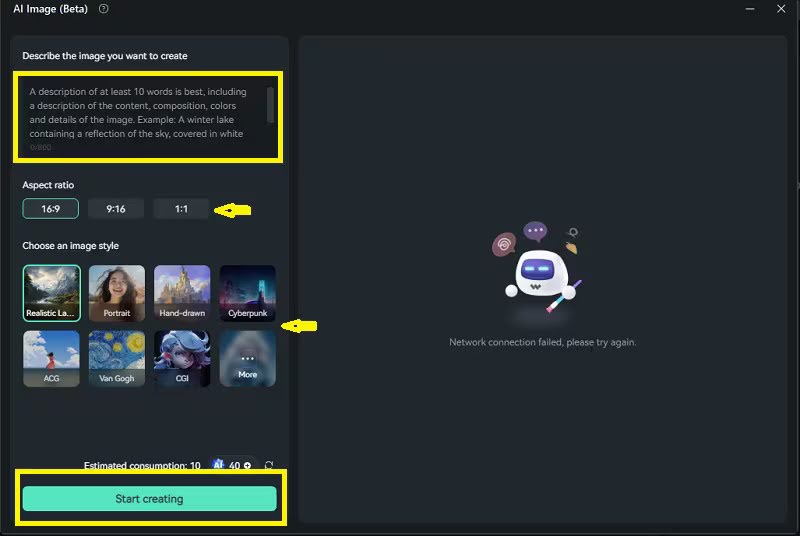
Users who want to work with Filmora AI Image Generator should begin by launching the software to create a new video project. Visit the main interface to find the AI Image button or panel that exists in the media section. The button leads to an image generation interface upon clicking.
2. Typing Your Prompt
You can open the AI Image Generator window to type your desired image description. Provide thorough details to the AI system so it can produce visual outputs with higher accuracy. Enter direct instructions such as “photo of a city skyline under sunset lighting” or “image of a beach with colorful palms beside clear blue ocean waters.” The clearer your description, the better the results.
3. Customizing the Image
After entering your prompt, you can choose the style (e.g., photorealistic, abstract, illustration) and resolution (e.g., 16:9 for YouTube or 9:16 for Instagram). You can also select the color palette and other visual attributes, depending on the image’s purpose.
4. Generating the Image
Once you’ve made your selections, click the Generate button. The AI will process your request and generate an image in just a few seconds. You’ll see the image pop up in the results window.
5. Integrating the Image into Your Video Project
The generated image becomes immediately available for import within the Filmora media library. Standard media functions allow users to add the generated image by dragging it onto their timeline next to other video clips or pictures. After importing photos into Filmora utilize the provided editing features to modify the images for your video sequence. You can enhance video content by applying text or video clips or audio on top of the image.
Tips for Maximizing the Impact of AI-Generated Visuals
-
Use AI-Generated Visuals Strategically: All AI-generated images in your video content must have functional importance. The visual elements in your video need to play either a background role for scene-setting or a graphic role for point emphasis while keeping the storytelling in mind.
-
Experiment with Styles: Different artistic styles should not intimidate you when you try to match video moods. Filmora AI Image Generator offers users extensive creative possibilities to generate different visual types including surreal landscapes as well as minimalist designs which perfectly complement video themes.
-
Stay On-Brand: Keep your brand’s visual identity in mind when using AI-generated visuals. By maintaining consistent colors, styles, and tones, you can reinforce your brand's image and create a cohesive look across all your social media content.
-
Leverage AI for Platform-Specific Content: Social networks use unique configurations when it comes to how they display videos and which aesthetics they prefer. Filmora AI Image Generator allows you to build platform-specific visuals through its optimization features,ensuring image optimization for clarity and resolution. which enables proper performance across TikTok's vertically-oriented content as well as Instagram's square dimension content.
How Filmora AI Image Generator Elevates Social Media Content
Once you grasp the basics, the real excitement is in how these AI-generated visuals can elevate the quality and impact of your social media videos:
Enhancing Storytelling with AI-Generated Backgrounds and Effects: Users can generate personalized backgrounds through Filmora AI Image Generator which perfectly aligns with their video conceptualization. Filmora AI Image Generator assists users in creating custom backgrounds which correspond to their video theme and provides landmarks as well as maps for travelogue and news updates. It also supports creating special visual effects such as fireworks and fog and comic-book textures. Users can initiate the AI creation process while adding the produced images directly into their timeline to enhance their video storytelling.
Custom Motion Graphics and Overlays: The videos you create with Filmora AI dynamic built-to-order motion graphics and overlays become more compelling. You can create arrows alongside stickers and custom emojis through the system for marking important moments or bringing your personal style into the content. The built-in tools in Filmora allow users to animate the AI-generated elements to produce dynamic moving graphics. The professionally designed high-resolution overlays these videos receive produce a sense of individuality and professional finish that also enhances their originality.
Consistency and Brand Identity: Through the Filmora AI image generator users create consistent social video branding. A consistent visual style defined through pastel colors and bold graphics lets AI software produce complementary image and background content. Using filmora AI image generator allows brand consistency through automated content generation without wasting time and effort while building viewer familiarity and trust. Taglines and logos need to be integrated into this process. AI enables the generation of visually attractive brand-aligned content at fast speeds that covers various digital platforms.
Conclusion
Filmora AI Image Generator brings users a revolutionized method to create enhanced visual content for social media platforms regardless of their design capabilities. Direct inclusion of AI-powered visuals into your video editing process helps save time while improving audience engagement and achieving brand consistency. Filmora AI Image Generator provides all creators from professionals to small business owners with a solution to generate stunning social media videos that maintain brand consistency. Explore the tool right now to witness its capability of advancing your social media video content!




.png "Significance and The Need Of CRM Solution for Fintech Companies")


