
Let's be honest, the way we used to learn in school wasn't exactly thrilling. A teacher standing at a blackboard, students copying notes, and everyone hoping something would stick by exam day. Sound familiar? Education is changing faster than ever, and choosing the right Learning Software in India can be the single most important decision your school or organization makes this year.

Looking for Educational Software?
Check out Techimply's List of the Best Educational Software in India for your business.
Whether you're a solo teacher building your first online course or an L&D manager scaling digital training across departments, the tools you pick will shape every learner's experience. The right Learning Software doesn't just organize content, it inspires, engages, and drives real results. What an e learning platform really is, how elearning authoring tools fit into the bigger picture, the top eight tools worth your attention, and how to choose the right solution for your unique needs. Let's dive in.
What Is Learning Software and How It Helps Schools?
At its core, learning software refers to any digital tool or system designed to help educators create, manage, deliver, and track educational content. It's the backbone of modern academic institutions, from K–12 schools to universities, community colleges, and even corporate training departments.
Here's how learning software genuinely transforms the school experience:
- Personalized Learning at Scale: Every student learns differently. Good learning tools adapt to individual pacing, allowing students to revisit content, skip ahead, or explore at their own rhythm, something a traditional classroom can rarely offer.
- Real-Time Progress Tracking: Teachers and administrators gain powerful visibility into how learners are performing. Instead of waiting for semester-end exams, you can spot a struggling student in Week 2 and intervene early.
- Cost Savings Without Compromise: Going digital slashes printing costs, reduces physical resource waste, and eliminates the need for expensive in-person sessions. Many e learning platforms actually pay for themselves within the first year.
- Scalable Delivery: A single e learning platform can serve ten learners or ten thousand with equal ease. As your school or program grows, your platform grows with you, no additional physical infrastructure required.
- Consistency Across the Board: Every learner sees the same quality of instruction, regardless of which teacher built the course or which campus they're attending. This standardization is especially powerful for multi-branch institutions.
What Are eLearning Authoring Tools?
ELearning authoring tools are specialized software applications that allow educators, trainers, and instructional designers to build interactive digital courses without needing to write a single line of code. Think of them as the "design studio" of the digital education world.
Using drag-and-drop builders, timeline editors, and built-in media libraries, you can create course content that includes videos, animated slides, scenario-based quizzes, branching simulations, and more. Most elearning authoring tools export content in SCORM, xAPI, or cmi5 formats, making it easy to upload finished courses to any LMS or e learning platform.
What makes great eLearning Authoring Software?
- An intuitive drag-and-drop interface that non-developers can master quickly
- Built-in quiz and assessment builders with feedback logic
- Multimedia support, audio, video, images, and animations
- Responsive design so courses look great on any device
- Real-time collaboration for teams working across locations
- SCORM/xAPI publishing for LMS compatibility
eLearning Authoring Software has evolved dramatically over the past decade. What once required a full development team and months of work can now be accomplished by a single motivated team using the right content authoring software, sometimes in just a few hours.
Do You Know?
Schools and organizations that adopt digital learning platforms now aren't just keeping up, they're building a competitive advantage that compounds over time. Early adopters consistently report higher learner satisfaction, better completion rates, and lower training costs than those who wait.
Advantages of an eLearning Platform
Still on the fence about going digital? Here's a closer look at the real-world benefits that make an e learning platform worth the investment.
- Flexibility and Accessibility: Learning no longer needs to happen in a classroom at a specific time. A solid e learning platform removes geographical barriers entirely; students can log in from home, a café, or the other side of the world.
- Engaging, Modern Content Formats: With the right e learning tool, educators can move far beyond text-heavy slide decks. Gamified quizzes, micro-learning videos, interactive branching scenarios, and virtual simulations all drive deeper engagement and better retention than traditional formats.
- Scalable Without the Headaches: From pilot programs to institution-wide rollouts, an e learning platform scales on demand. Add new users, new courses, and new departments without worrying about physical logistics.
- Data-Driven Decision: Making Modern learning tools come with analytics dashboards that surface exactly what's working and what isn't. Which modules are students skipping? Where are drop-off rates highest? This data is gold for continuous improvement.
- Significantly Lower Long-Term Costs: Digital education reduces overhead on printing, room rentals, physical materials, and in-person facilitation. Most institutions see measurable ROI within 12 to 18 months of adoption.
- Compliance and Certification Management: For schools and enterprises that need to track certifications, renewal deadlines, or mandatory training completion, an elearning platform automates the entire process, saving your admin team hours every week.
Top 8 eLearning Software & Tools to Consider
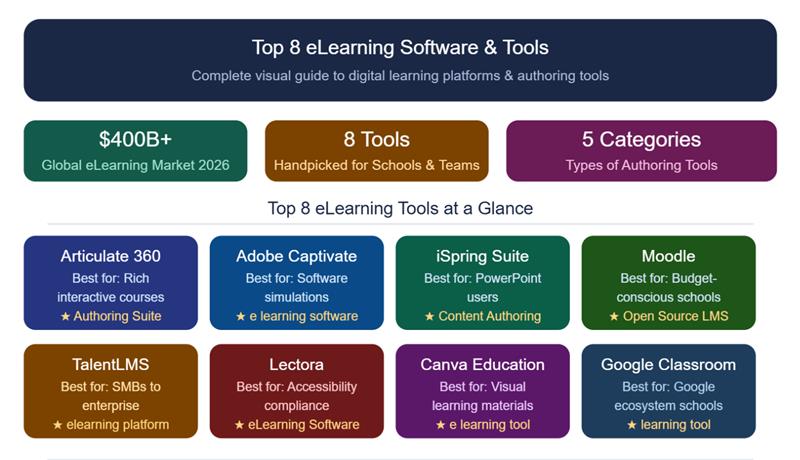
With the global online education market expected to grow at a CAGR of 11.68% from 2025 to 2033, here are the top 8 eLearning software and tools to consider.
1. Articulate 360
Arguably, the most popular eLearning Authoring Software suite in the world. It bundles Storyline 360 (for complex, interactive courses), Rise 360 (for quick, beautiful responsive content), and several other tools. Perfect for teams that need polish and power.
2. Adobe Captivate
A professional-grade e-learning software built for responsive course creation. Captivate shines when you need to record software simulations, walk users through applications, or build technologically detailed training modules. Popular in both corporate and academic settings.
3. iSpring Suite
An outstanding content authoring software that lives inside Microsoft PowerPoint. If your educators are already comfortable in PowerPoint, iSpring is arguably the fastest path to publishing professional eLearning courses. Minimal learning curve, maximum output.
4. Moodle
The world's most widely adopted open-source e learning platform. Moodle is completely free, endlessly customizable, and backed by a massive global community. It requires some technical know-how to manage but offers unmatched flexibility for schools on a budget.
5. TalentLMS
A cloud-based learning platform popular for its clean, intuitive interface and feature-rich environment. It supports gamification, blended learning, and detailed reporting. Equally suitable for small teams and large enterprises.
6. Lectora
A robust e learning software for advanced instructional designers who need deep accessibility compliance (Section 508, WCAG). Lectora is a go-to choice for government agencies, healthcare organizations, and enterprise training programs.
7. Canva for Education
Not your typical e learning tool, but Canva's education edition deserves a spot on this list. It helps educators design engaging visual learning materials, infographics, presentations, worksheets, quickly and with zero design experience.
8. Google Classroom
A free, straightforward learning tool from Google that integrates seamlessly with Google Drive, Docs, Meet, and the rest of G Suite. If your school is already in the Google ecosystem, Classroom is a natural, low-friction starting point.

Pro-tip
Before committing to any e learning software, always request a free trial or a live demo. Run a small pilot group of real teachers and learners through the tool, gather honest feedback, and evaluate the experience from both sides. This simple step will save you thousands of dollars and months of frustration, and help you make a confident, informed decision.
Types of eLearning Authoring Tools
Choosing the right type of e Learning Authoring Software depends heavily on your team's skill level, available budget, collaboration needs, and the complexity of your course content.
Not all e learning authoring tools are built for the same audience or workflow. Here's a breakdown of the main categories:
- Cloud-Based Tools: These run entirely in a web browser, no installation required. They're ideal for remote teams who need to collaborate in real time. Rise 360 and Canva are strong examples. Updates are automatic, and courses are accessible from anywhere.
- Desktop-Based Tools: Installed directly on your computer, these learning tools typically offer more advanced features and finer creative control. Articulate Storyline and Adobe Captivate are the gold standard here. Best for experienced instructional designers with complex content needs.
- PowerPoint Add-ins: These extend your PowerPoint skills into fully functional content authoring tools without changing your workflow. iSpring Suite is the leading example. Your educators build in an environment they already know and love.
- Open-Source Platforms: Free and highly customizable, open-source solutions like Moodle give technically capable teams full control over every aspect of their learning environment. The trade-off is that setup and maintenance require dedicated IT support.
- Mobile-First Tools: Designed specifically for learners on the go, these prioritize microlearning, push notifications, and content that performs on a small screen. Ideal for just-in-time training in frontline or field-based settings.
ELearning Software vs. Content Authoring Tools: What's the Difference?
This is one of the most frequently misunderstood distinctions in the world of digital education, and clearing it up will save you a lot of confusion when evaluating tools. For creators selling their own courses, an all-in-one course platform combines course creation, sales, and community features in one place.
EeLearning Software: (commonly called an LMS — Learning Management System) is the platform where your finished courses and are delivered to learners. It handles enrollment, access control, progress tracking, assessments, certificates, and detailed reporting. Think of it as the building your training program calls home.
Content authoring software: On the other hand, is the studio where you build that content in the first place. It's where instructional designers drag and drop, animate, script, and polish courses before uploading them to the LMS.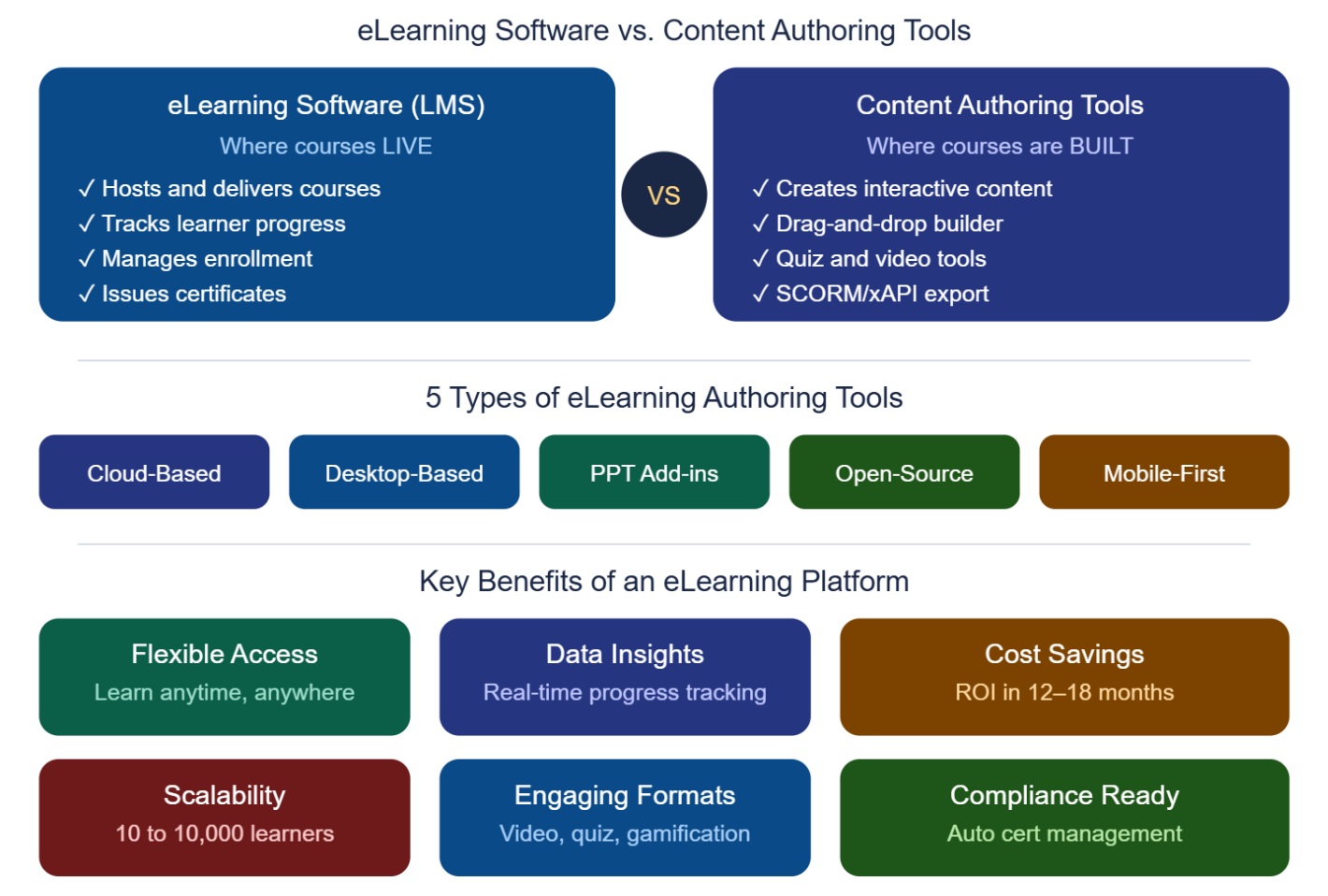
In a well-structured digital learning environment, you'll typically use both a best-in-class e learning tool for content creation, paired with a reliable e learning platform for delivery, management, and reporting. The two work hand-in-hand and are not in competition.
Conclusion
The decision of the best e learning software does not have to be daunting. First, get a clear grasp of your main need: Do you need to develop engaging course content? Then make a priority in content authoring Tools such as Articulate 360 or iSpring Suite. Do you specialize in handling and providing that content to hundreds of learners? Next, spend on an effective elearning system such as Moodle or TalentLMS. The digital revolution in learning is not an upcoming phenomenon; it is currently taking place.