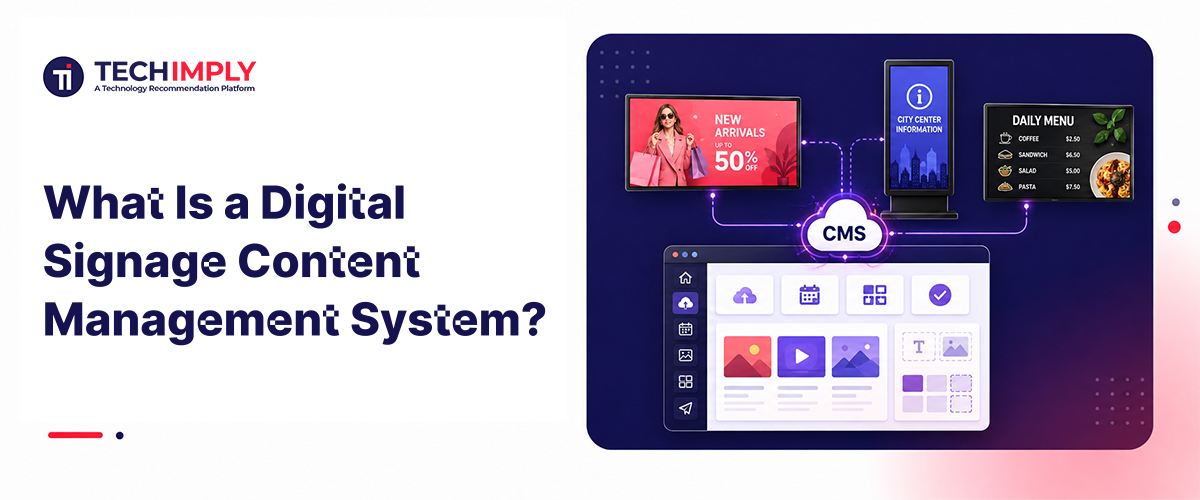
A digital signage content management system (CMS) is the software that lets a team create, schedule, and publish content to every screen in a network from one dashboard instead of updating each screen by hand. It is the layer between “we have a message to show” and “the message is on the screen” — covering everything from uploading a video to setting when it plays and checking whether the scheduled media ran.
The term gets used loosely. Some vendors call it a digital signage platform, while others describe the same category as content management software for digital signage. In practice, the core product is usually a web-based dashboard that manages content, screens, users, and schedules centrally.
Where the CMS Sits in a Digital Signage System
A full digital signage deployment has three layers: the display itself, the media player that decodes and shows content, and the CMS that decides what the player should display and when. The CMS is the layer a content team interacts with day to day. Once the equipment is configured, the player and screen normally run without direct attention.
That is a narrower job than digital signage software as a category, which may also cover hardware compatibility, device provisioning, network administration, and remote troubleshooting. A digital CMS specifically handles the content and scheduling layer.
Many commercial systems bundle CMS functions with device management. The distinction still matters during vendor evaluation. A CMS-only product may leave hardware monitoring and player recovery to another tool, while a broader digital signage CMS platform can place content operations and device status in the same dashboard.
What Does a Digital Signage CMS Actually Do?
Strip away the marketing language and a digital signage CMS covers five jobs:
- Content creation and organization. Users upload images, videos, web content, and data-driven assets, then organize them in a shared media library.
- Scheduling. Teams define what plays, on which screens, and at what time — such as a morning menu that switches to lunch at 11 a.m. or a promotion that expires after the weekend.
- Playlists and layouts. Editors arrange media into a sequence or divide a screen into zones for video, text, pricing, and live information.
- Remote publishing. A digital signage content manager can send an update to one display, one location, or an entire network without touching the physical device.
- Reporting. The system records what was scheduled, what was delivered, and, on more advanced setups, whether the screen was operating at the time.
Those functions explain why digital signage content management becomes more important as a network grows. A single display can tolerate occasional manual changes. A distributed network needs consistent naming, screen groups, expiration dates, user permissions, and a record showing who changed each campaign.
The workflow also reduces content drift. Corporate marketing can publish a master campaign, while regional teams adjust approved local fields such as store hours, language, availability, or event details. The underlying layout remains controlled even when individual locations need different information.
What Should a CMS Prove After Publishing?
A dashboard can report that it sent a playlist update, but a successful transfer does not automatically prove what a visitor can see. The display may be powered off, the player may be frozen, the wrong input may be selected, or an older file may remain visible.
For teams evaluating a verified digital signage content management system, it's worth looking at how publishing controls and screen-status data can sit within the same operational workflow. This type of output attestation helps separate a completed delivery event from evidence that the intended content reached the display endpoint.
That distinction becomes more useful as the network expands. A restaurant group running one promotion across forty locations does not need another long report showing which players accepted a file. The operations team needs an exception list showing which screens do not match the current plan, when the mismatch began, and which person or location owns the next action.
Remote content management for digital signage should therefore answer several different questions. Was the campaign approved? Did the player download the correct assets? Did the schedule become active? Is the player online? Is the display showing the expected output? A platform may answer some of these questions without answering all of them.
Monitoring becomes actionable when the dashboard preserves a timeline. Editors can compare the content version, publishing event, active schedule, player status, and recovery attempt without reconstructing the incident across unrelated systems.
What Should a Pilot Test Before Rollout?
A pilot should test the real operating chain rather than a polished demo playlist. The CMS, player, display, network, user roles, and update process all affect the visible result.
Connected players need controlled configuration, restricted access, authorized software updates, and a readable device state. Without that information, administrators may struggle to distinguish a content problem from a connection, player, or display problem.
|
Pilot check |
Test method |
Failure the test can expose |
|
Offline playback |
Disconnect the player after the active campaign has been cached |
Blank output, missing assets, or the wrong fallback content |
|
Schedule transition |
Run a daypart change and allow a campaign to expire |
Old media remaining active after its scheduled end time |
|
Role permissions |
Give local and corporate users different publishing rights |
Network-wide changes or approval bypasses |
|
Player recovery |
Restart a player during playback and restore connectivity |
Slow recovery, corrupted media, or a lost schedule |
|
Visible output |
Compare the active schedule, player log, and screen state |
A delivered file that never becomes visible |
|
Motion review |
Check scrolling, flashing, and automatically updating creative |
Distracting movement or content that changes too quickly |
Motion review is easy to overlook because digital signs run automatically and viewers cannot always pause what is playing. Long scrolling sequences, persistent animation, rapid updates, and flashing effects can reduce readability. Template rules and approval workflows can catch those issues before a campaign reaches public screens.
Access control also changes with scale. Marketing may prepare campaigns, regional teams may edit local details, and IT may manage players and connectivity. Separate roles keep those responsibilities distinct, while the audit history preserves the sequence of edits, approvals, publishing events, and device changes.
The goal is not to add process for its own sake. The pilot should expose the points where a routine content change could become a network-wide error.
What Changes When a Digital Signage Network Starts to Scale?
The first challenge in a small deployment is usually getting content onto the screen. At scale, the harder problem is deciding who can change it, where each version should run, and what happens when a data source or device fails.
A CMS that works for three displays can become another manual bottleneck when the network expands across locations, time zones, languages, and audience groups. Digital signage content management systems must therefore organize screens as operational groups rather than as an unstructured device list.
Screen groups and location tags control audience targeting, while reusable templates keep local edits from breaking the master design. Role-based permissions and approval workflows let a regional manager update store information without gaining access to every display in the organization. Language support, campaign expiration rules, and emergency-alert overrides allow the same content framework to operate across different sites.
API integrations are another dividing line. They allow pricing, inventory, calendars, room schedules, KPI dashboards, and other data feeds to populate dynamic content without repeated manual entry. The digital signage content management software should also define fallback media for a failed feed, preserve the last valid data set, and record when the source stopped refreshing.
Analytics and playback reports are most useful when they highlight exceptions. A dashboard that generates more raw data can create another monitoring task instead of solving one. A stronger digital signage CMS system identifies screens with stale content, interrupted playback, missed schedule changes, or unavailable source data.
Cloud-based access and automatic updates can reduce local maintenance, but they do not remove the need for compatibility testing. The selected digital signage CMS software still has to support the media players, operating systems, screen resolutions, codecs, orientations, and network conditions used at each location.
A practical scale test is whether a local editor can change one approved field, corporate can expire a campaign everywhere, and an offline player can recover the correct schedule without rebuilding the screen from scratch. When those actions remain predictable as the network grows, the CMS is supporting the operating model rather than merely storing media.